Bill of Quantities Format: Where Most Contractors Go Wrong
BOQs (Bill of Quantities) are the foundation of any construction project. They dictate what’s being built, how much it’ll cost, and what gets billed. But here’s the problem: most contractors don’t pay enough attention to how BOQs are formatted.
In India and GCC countries, it’s common to see BOQs riddled with errors. Misaligned columns, wrong units of measure (UOM), duplicate line items, or inconsistent rates — these small mistakes add up. And the consequences? Missed quantities, disputes with clients, and cost overruns that eat into your margin.
Let’s break it down practically.
Why BOQ Formatting Matters
Think of the BOQ as the “client’s view” of the project (source: JobNext documentation). It’s their language, their deliverables, and their expectations. If your BOQ doesn’t align with what the client expects:
- Disputes: The client questions your rates or quantities.
- Billing Delays: Poor structure makes it hard to split BOQs into stage-wise or milestone-based payments.
- Cost Errors: Missing quantities or duplicate items throw off your estimates.
How do you avoid this? Let’s dive into the format itself.
BOQ Structure: Best Practices
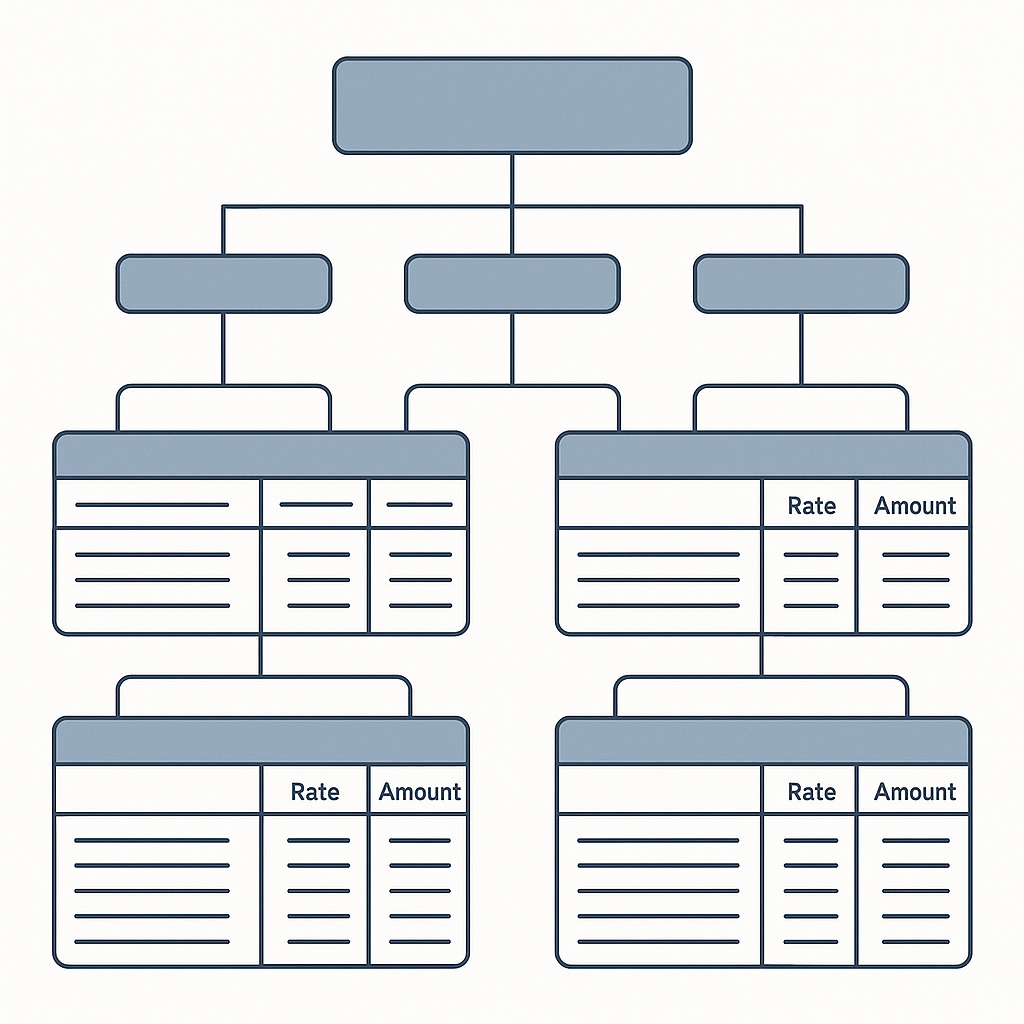
A well-structured BOQ has three key elements:
-
Hierarchy: Organize BOQ items into sections and sub-sections. For example:
- Section: Civil Works
- Sub-section: Foundation
- Item: RCC M25 Concrete
- Item: Excavation
- Sub-section: Superstructure
- Item: RCC M30 Columns
- Sub-section: Foundation
- Section: Civil Works
-
Standardized Fields: Every BOQ item should include:
Field Description Item Code Unique identifier (e.g., CW-01) Description What’s being delivered (e.g., RCC M25) Unit UOM (e.g., cubic meter, kg) Quantity How much is required Rate Price per unit Amount Automatically calculated (Rate x Quantity) -
Accuracy: Double-check quantities and rates. Use a review process to catch errors before submission.
JobNext’s Excel BOQ Upload feature simplifies this. You can download a pre-formatted template, fill in your data, and upload it directly into the system. But beware: if your data doesn’t match the template exactly, the import fails.
Stage-Wise Billing: Why It’s Critical
For phased projects, BOQs can be subdivided into stages. This allows for milestone-based payments — a lifesaver for lump-sum contracts. Here’s how it works:
- Foundation: A percentage of the total project cost.
- Structure: Another percentage of the total project cost.
- Finishing: The remaining percentage.
The system calculates the billing amount as:
BOQ Rate x Stage Percentage
But this only works if your BOQ is structured correctly. If stages don’t add up to 100%, or if line items are missing, you’ll face billing disputes. (source: JobNext documentation).
Common Mistakes in BOQ Preparation
- Skipping the Template: Uploading BOQs without using a standardized Excel template leads to mismatched columns and import errors.
- Wrong UOM: Using inconsistent units (e.g., meters vs cubic meters) confuses billing and procurement teams.
- Duplicate Items: Repeating line items with different rates creates disputes during client reviews.
- Inaccurate Quantities: If quantities don’t match site requirements, you’ll end up with material shortages or surplus.
FAQ
Q: Can BOQs be adjusted mid-project? A: Yes, but it’s messy. Variation tracking becomes difficult unless the BOQ is tied to scopes and progress billing. Tools like JobNext make this easier.
Q: What’s the best way to prepare a BOQ for custom projects? A: Use Excel uploads for large BOQs. For smaller, repeatable jobs, consider WBS templates.
Q: How do I handle disputes over BOQ rates? A: Use a quoting method that breaks rates into materials, labor, and plant costs. This ensures transparency. Estimatenext.ai discusses how AI-powered tools simplify rate matching.
Conclusion: Protect Your Margins
BOQ preparation isn’t just paperwork. It’s the backbone of your project’s profitability. A sloppy BOQ can cost you weeks in disputes and lost margin.
If you’re tired of manual errors and billing delays, JobNext can help. Get started free →
Learn more at EstimateNext


