The Silent Margin Killer: Poor BOQ Preparation
You might think your Bill of Quantities (BOQ) is airtight. It looks clean, the numbers align, and your client signed off. But here’s the brutal truth: poorly structured BOQs eat into margins like termites in wood. I've seen this firsthand, with contractors losing up to 15% of project profitability simply because their BOQ didn’t follow Indian Standard (IS) 1200 guidelines for civil works.
Why does this happen? Because the BOQ is not just a list—it's the backbone of your project execution. If the hierarchy is messy, if units don’t match, or if rates are misaligned with actual scopes, you’re setting yourself up for billing disputes, resource misallocation, and even compliance penalties.
IS 1200 Standards: What You Need to Know
IS 1200 is the benchmark for measurement and BOQ preparation in India. It covers everything from units of measurement to item descriptions for civil works, ensuring consistency and transparency.
Here’s a simplified breakdown:
| Section | Key Requirement |
|---|---|
| Units of Measure | Standardized units like Cum, Sqm, Rmt, Nos, etc., must be used uniformly. |
| Item Codes | Unique identifiers for each BOQ line item; can align with client numbering schemes. |
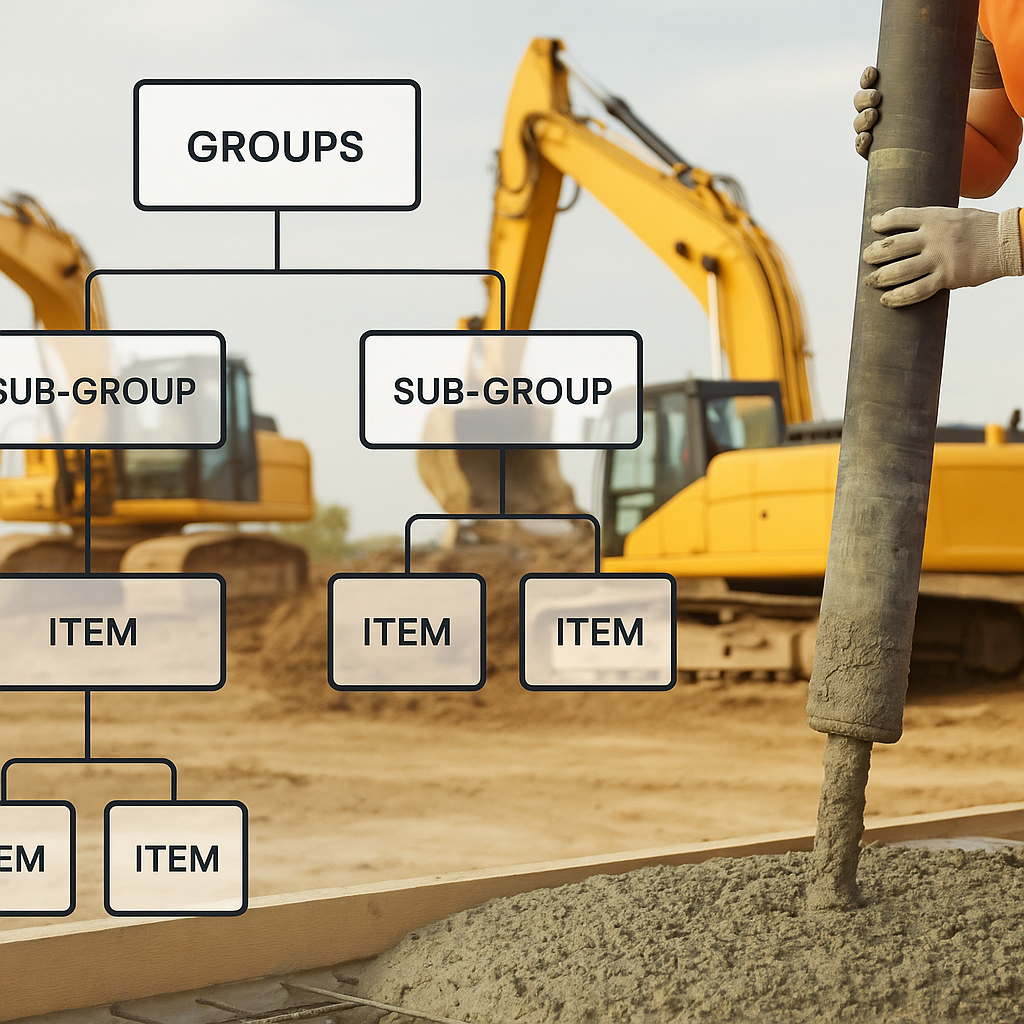
| Hierarchy | Group → Sub-group → Item structure ensures clarity and traceability. |
| Rates | Rates must be contractually defined and tied to units. |
Let’s break it down further:
Units of Measurement
Why are units so important? Imagine quoting excavation work in “Truckloads” instead of cubic meters (Cum). Not only does this create ambiguity in billing, but it also invites disputes regarding scope fulfillment. IS 1200 mandates uniform units across all BOQs to ensure clarity.
Item Codes
Item codes act as unique identifiers, enabling traceability and avoiding confusion during billing or client audits. For example, a plumbing BOQ item might have the code PLUMB001, while a civil works item might use CIVIL005. These codes must align with client numbering schemes for seamless integration.
Hierarchy
A proper hierarchy—such as Group → Sub-group → Item—ensures that BOQs are easy to read, manage, and execute. For example:
- Group: Civil Works
- Sub-group: Foundation
- Item: Concrete (Cum)
- Sub-group: Foundation
Rates
Rates must be tied to the units of measurement and contractually defined. For instance, the rate for excavation in Cum should align with CPWD scheduled rates or market analysis.
Real-World Example: BOQ Preparation Gone Wrong
A mid-size contractor in Pune built a BOQ for a ₹15 Cr civil works project based on IS standards—but missed one crucial step. They didn’t split the BOQ into stages for milestone-based billing. When the client delayed payments, the contractor couldn’t prove completed milestones because their BOQ didn’t align with actual work progress. Margin erosion? 12% over six months.
What Went Wrong:
- No Milestone Tracking: Without stage-wise splits, they couldn’t accurately link completed work to invoices.
- Disputes: The client contested the invoices, claiming insufficient progress documentation.
The Fix:
Had they used JobNext’s Stage-Wise BOQ feature, they could have linked each milestone to a percentage of the total BOQ. This feature automatically allocates quantities to stages, ensuring billing ties directly to progress.
Using JobNext to Fix BOQ Errors
Here’s how JobNext’s BOQ module helps:
1. Hierarchical Structure
The BOQ is organized in a tree format—groups like "Civil Works" break into sub-groups like "Foundation" and "Superstructure," with leaf-level items carrying rates and quantities.
2. Stage-Wise Billing
Divide BOQ items into phases, with percentage allocations for milestone tracking. For example:
| Milestone | Percentage of BOQ |
|---|---|
| Excavation | 20% |
| Concrete Pouring | 40% |
| Finishing | 40% |
3. Error-Free Uploads
The platform ensures your BOQ matches the required IS 1200 column structure, flagging corrections before upload.
4. Progress Tracking
Work progress rolls up to the BOQ level for seamless client reporting, enabling dispute-free invoicing.
Results Achieved:
- Billing Accuracy: Milestone-based billing ensures payments align with progress.
- Dispute Avoidance: Transparent BOQs eliminate interpretation errors.
- Margin Protection: Proper tracking prevents revenue leakage.
Common BOQ Mistakes (And How to Avoid Them)
1. Non-Standard Units
Using inconsistent units like “Truckloads” instead of Cum. Fix it by aligning units to IS 1200.
2. Incorrect Hierarchy
Grouping items haphazardly (e.g., mixing civil works and MEP). Use a clear group → sub-group → item structure.
3. Rate Mismatches
Assigning rates without cross-checking scheduled rates. AI tools like EstimateNext can automate rate matching.
4. No Stage-Wise Splits
Forgetting to break BOQ items into milestones. Use JobNext’s stage-wise functionality.
5. Poor Documentation
Failing to document progress validations properly. Implement a system to log completed milestones.
How to Build a BOQ That Works
Follow this checklist:
1. Download IS-Compliant Templates
Always start with a structured BOQ template (JobNext provides one).
2. Use Unique Item Codes
Don’t reuse codes—assign unique identifiers for traceability.
3. Define Groups Clearly
Separate civil works, MEP, plumbing, etc.
4. Align Units to IS 1200
Stick to standardized measurements.
5. Integrate Stage-Wise Billing
For phased projects, split quantities into milestones.
FAQ
Q: Can IS 1200 standards apply to non-civil works?
A: While IS 1200 is specific to civil works, its principles—standardized units, clear hierarchy—apply universally.
Q: How does JobNext prevent BOQ errors?
A: It validates your BOQ structure before upload, flags mismatches, and integrates progress tracking.
Q: What’s the difference between BOQ and detailed estimates?
A: BOQs define deliverables for billing; detailed estimates calculate execution costs.
Q: How do I handle variations in BOQ items?
A: Use JobNext’s variation tracking tool to align BOQ changes with client approvals.
Q: Can BOQ errors result in legal disputes?
A: Yes, poorly prepared BOQs can lead to billing disputes and even breach-of-contract claims.
Comparison Table: Manual BOQ vs JobNext BOQ
| Feature | Manual BOQ | JobNext BOQ |
|---|---|---|
| Hierarchy Management | Prone to errors | Auto-organized tree structure |
| Stage-Wise Billing | Manual tracking required | Automated milestone splits |
| Error Checking | Human review needed | AI-powered validation |
| Progress Tracking | Requires additional tools | Integrated tracking |
| Dispute Resolution | High chances of disputes | Transparent, traceable invoicing |
Call to Action
If you’re tired of losing margins to BOQ errors, JobNext can help. Get started free →
Learn more at EstimateNext


